
CorridorKey by blace.ai for After Effects and Premiere Pro
Core Features
- Create high-quality green screen keys with one click
- AI model "repairs" the transparent pixels, giving you compositing ready results
- Ships with several custom-trained AI models
Processing happens fully locally, running on our high-performance C++ blace.ai engine.
Your data never leaves your machine.
20,000+ customers trust our products, from freelance creators to enterprise teams.
Supports Apple Silicon, NVIDIA and AMD GPUs (Windows) for hardware acceleration.
Features
New: BlaceKey 1.5 model!
Our new self-trained model does not only excel at details and processing speed, but also comes with AI-based despill for true one-click keying workflows.
Corridor Crew x Blace Plugins
We teamed up with Corridor Crew to bring their CorridorKey model into your favorite VFX application - built ontop of our blace.ai engine.
Restores Color
The AI model is trained to bring back the original foreground color, even in high-detail or blurred areas.
Excels at fine details
Recover fine details from your footage. This will even work with rough garbage mattes.
New: BlaceKey model
BlaceKey is a unified model which works on both blue- and greenscreens.
SOTA rendering speed
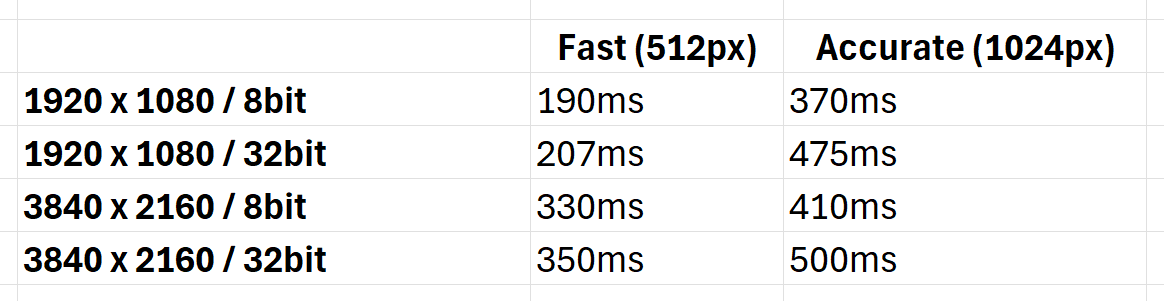
Benefit from the highest rendering speed on the market. By leveraging end-to-end hardware acceleration you get top-notch rendering speeds. (benchmarks done on a RTX 3090)
Easy to use
CorridorKey by blace.ai comes with an convenient interface and a few simple parameters for full control.
Easy to setup
- Use AE's internal Advanced Spill Suppresor to remove bleeding colors!
- You will get the best performance on a NVIDIA / Windows machine with Mercury GPU Acceleration (CUDA) enabled.
- Disable Composition -> Preview -> Cache Frames When Idle for best responsiveness of the plugin.
Tutorials
System Requirements
| Windows with NVIDIA GPU >= 8GB | Windows with non-NVIDIA GPU >= 8GB | Apple Silicon with MacOS Sequoia or newer and >= 16GB RAM | Other MacOS |
|---|---|---|---|
| ✅ | ✅ * | ✅ | ❌ |
Documentation